Field

Studio for the field, on hardware that survives it

TameChaos Field is a standalone field authoring product built on the TameChaos Studio core. Walk a facility and author a real Studio project on the spot — nodes in the diagram, photo evidence, provenance, and the facility map — with no server, no Mac, no cloud, and no network. When a project has an Edge server, live runs and role-gated run control light up on top of it. On Android, for the hardware the field actually needs.
What it is

A field authoring product, built on the Studio core

Field is Studio’s design core on Android, in the hands of whoever is standing in the facility. It authors the project itself — and then adds two things no other Studio platform has.
Standalone by default
Field opens straight into your local projects. Walk a facility, capture what’s actually there, and take away a real Studio project — with no server, no Mac, no cloud, and no network anywhere in that sentence.
Built on the Studio core
The same design core and the same project format as Studio. What you author in the field is the same project a Mac, iPad, or Windows build opens — one specification across the platforms, held to it by a conformance gate rather than by good intentions.
Its own product, not a fifth Studio build
Field adds what the Apple and Windows builds can’t: a live Edge server when a project has one, and hardware that works in sun, rain, and gloves. Matching Studio on iPhone is Field’s floor, not its target.
The Studio core

Author the project where the work is

Field’s first release is being built to do on Android what Studio does on iPhone: open a real Studio project, work it in full, and capture the facility straight into it. With nothing else present — no server, no Mac, no cloud, no network.
The whole project, in your hand
The same project navigator Studio shows on a phone — every content category, not a stripped-down capture form. Open the project for the facility you’re standing in and work it, all of it, on the spot.
Capture straight into the diagram
What you find becomes a real node in the physical-process diagram — photo evidence attached, the catalog part named where you know it, and a record of who captured it and when. Not a bundle for someone to reconcile later.
Facilities, and where they are
A project holds facilities, and each one carries a real-world location — so what you capture is anchored to the place it belongs to, and the map knows where you’re standing.
Encrypted on the device
Your Studio project lives on the handset, encrypted at rest, with backup and restore — in a format the desktop builds open unchanged rather than one that strands the day’s work on a phone.
Cold start touches nothing
No pairing wall, no session, no network call between the launcher and your project. A device that has never seen a server, a Mac, or an internet connection is a device that can do a day’s work.
The same project, on every platform
One project specification across Mac, iPad, iPhone, Windows, and Android, verified against a shared fixture corpus in CI — so a project that leaves the field opens on the desktop with the field’s work intact.

Where this stands today

Field is one app being built in two halves, and they aren’t at the same place. The Edge side below is built and in testing — it’s what the screenshots show. This Studio side is what’s being built now, so read it as what the first release is for rather than as something you could install this afternoon. Recognising a component from a photo and matching it to a catalog part is further out again, on the roadmap behind a catalog with data in it.

Plus an Edge, if the project has one

Everything Field already does with a live server
A Studio project can be associated with a nearby Edge server, and when it is, the runtime surfaces light up: its Edge projects, live runs, anomalies, journals, and run control gated by the role that Edge issued you. Leave a project unassociated and nothing about the app is missing — this is capability a project acquires, not the way in.
Associate a project with an Edge
Scan a QR code or enter a short code to pair with a nearby Edge server, then attach it to the Studio project it belongs to. Credentials live in the device’s secure storage — never in the cloud, and never in the project file.
Watch runs live
Monitor active runs and anomaly and status events in real time over a live stream, with a polling fallback for when the connection on-site gets rough.
Respond to anomalies on the spot
Acknowledge alerts, journal what you see, and drop observation nodes against a run — right where you’re standing, the moment something happens.
Control the run — by your role
Start, pause, resume, or stop a run, gated by the role the Edge issued to the device. The Edge authorises and audits every action; the device asks, the server decides.
Render Studio-authored HMIs
View the operator dashboards authored in Studio, rendered read-only and single-column for a phone. Field renders those HMIs; composing them is a canvas job.
Background vigilance
A foreground service keeps watch and surfaces critical anomalies even when Field isn’t the app in front of you — so nothing important slips past while you’re working.
Quiet when there’s no Edge
With no Edge attached, none of that runs: no reconnect loop, no polling worker, nothing waking the device to reach a server it doesn’t have. Optional means optional, including for the battery.
Losing the Edge never loses the project
Unpair, lose the signal, or have your access revoked, and the Edge surfaces dim while your Studio project is untouched. The project is the durable thing; the server is something it can reach.
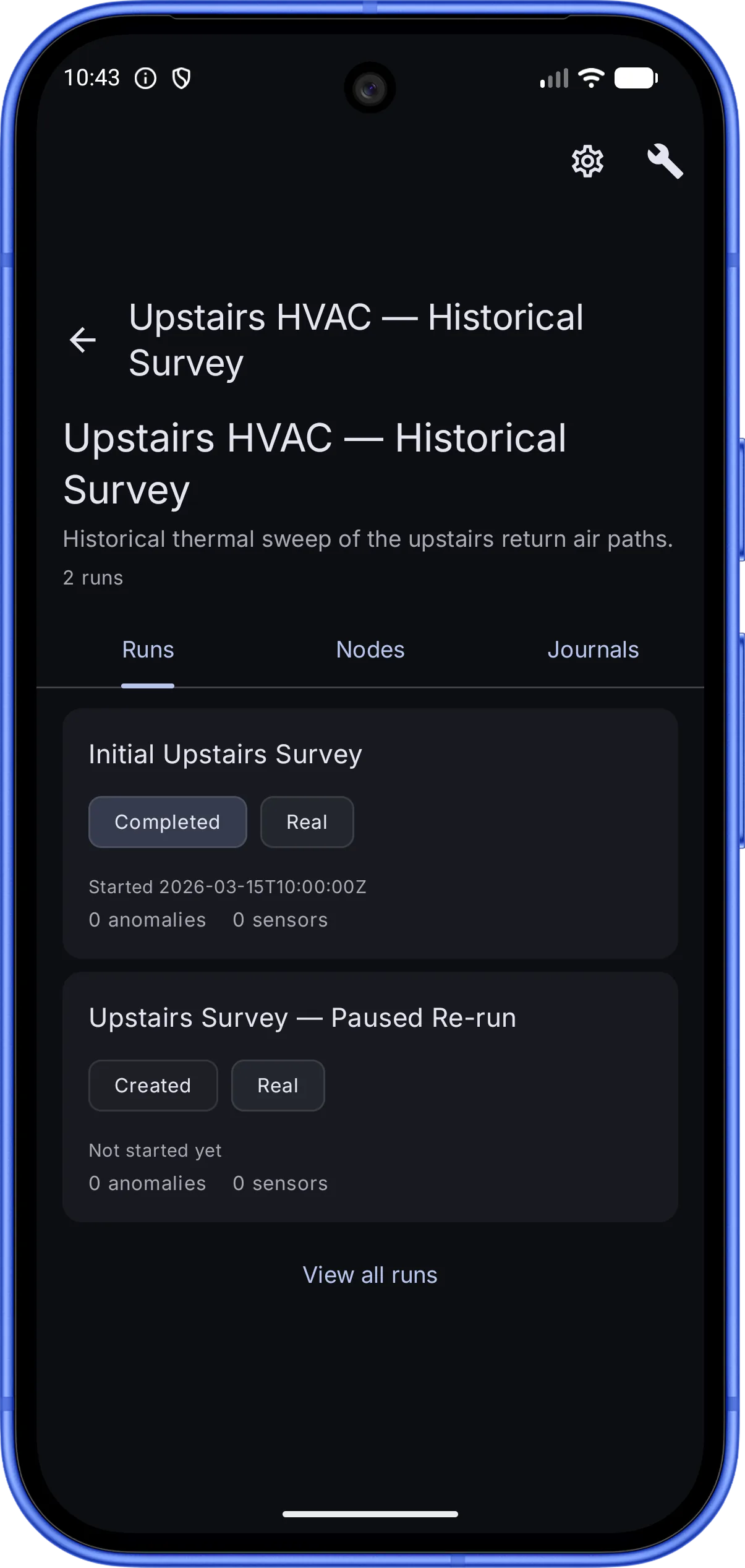
TameChaos Field on an Android phone with a Studio project associated to a local Edge server, showing the process “Upstairs HVAC — Historical Survey” — a historical thermal sweep of the upstairs return-air paths, with Runs, Nodes, and Journals tabs. The Runs tab lists two runs with status and type chips: “Initial Upstairs Survey” (Completed, Real) and “Upstairs Survey — Paused Re-run” (Created, Real), each showing its start time and anomaly and sensor counts.
An Edge project’s process and its runs
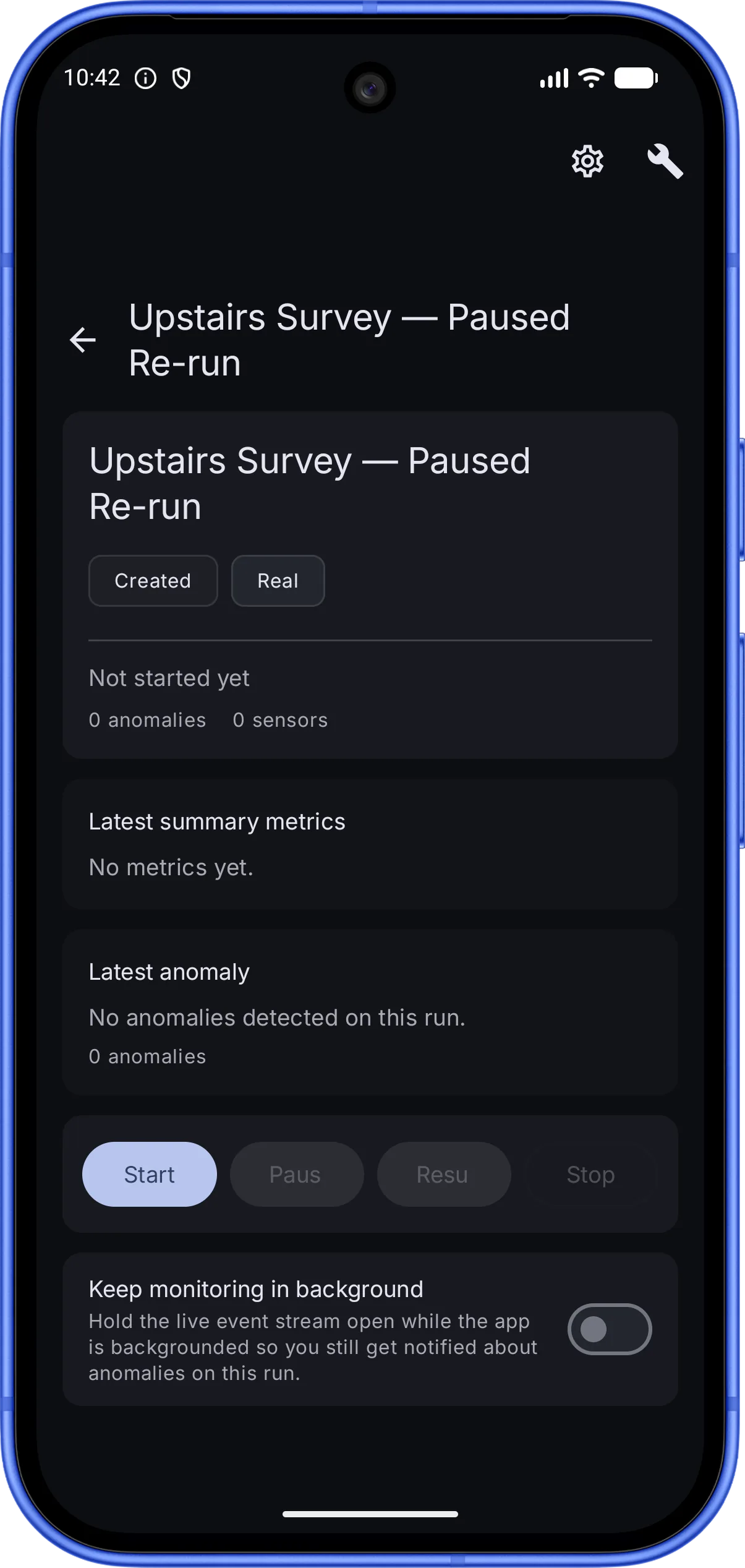
TameChaos Field on an Android phone showing a single run, “Upstairs Survey — Paused Re-run”, on an associated Edge server: status and type chips (Created, Real), latest-summary-metrics and latest-anomaly panels, Edge-gated run-control buttons (Start, Pause, Resume, Stop), and a “Keep monitoring in background” toggle that holds the live event stream open so anomalies still surface when the app is backgrounded.
Monitor and control a run

Two kinds of project, and this page means both

A Studio project is the thing you author and own — it lives on your device and goes wherever you take it. An Edge project is a projection of something running on a server: you can watch it, respond to it, and act on it, but the Edge owns it. That’s also where run control sits. Field asks; the Edge decides, against the role it issued this device, and records what happened. It is not a safety-critical or certified control interface, and nothing on the phone can make it one.

Plus the hardware

Android goes where the work is

Rugged, manageable Android hardware is procurable in a way Apple’s isn’t — and it exposes capability Apple devices don’t. That’s the third layer: matching Studio on iPhone is Field’s floor, and the hardware is how it goes past it.
Readable in direct sun
Sunlight-readable displays, because a plant walk at noon on a consumer phone is a walk spent shading the screen with one hand.
Operable in gloves
Glove-compatible touch and targets sized for it — the one place the Android surface deliberately diverges from Studio on iPhone rather than matching it.
Batteries you swap without stopping
Hot-swappable batteries and long-life packs, so a survey is bounded by the work left to do rather than by the charge left in the device.
Scan what’s already on the equipment
Integrated barcode and QR scanning — the asset tag, the nameplate label, the pairing code — read by hardware built for it instead of by a camera doing its best.
Standard App Mode
Field on an ordinary Android phone or tablet, installed and used like any other app. This is the mode everything above is described in, and it needs no special hardware at all.
Managed Field Device Mode
The same app on a preloaded rugged device, in a kiosk or managed-launcher configuration with restricted settings and a locked-down field workflow — a deployment profile of Field, not a separate product or a second codebase.

A direction, not a device you can buy

There is no TameChaos device, no vendor chosen, and nothing to order. The plan is to test and certify commercially available rugged Android hardware first, and a preloaded, managed device is a direction we’re building toward rather than a product on offer. Field runs on ordinary Android phones and tablets, and it always will — a rugged device is never required, and none of this makes TameChaos a device-management product.

Where Field is

In development → early access → MVP

Field is coming soon for Android. It’s substantially built on the Edge side and actively being built on the Studio side — here’s the honest staging. Early access is a real beta, not a finished, generally available product.
Now
1 · In development
The Edge side of Field is built and in testing — pairing, live runs, anomalies, journals, and role-gated run control, which is what the screenshots above show. The Studio authoring core is what’s being added to it now. Pre-release software, and not on Google Play.
Next
2 · Early access
Join the waitlist and the first builds come to you: standalone project authoring on Android, with the Edge surfaces there for projects that have one. A real beta — early, rough in places, still changing.
Then
3 · MVP
The first shippable Field: local Studio-project authoring at the level Studio reaches on iPhone, the full Edge surface on top of it, and the managed rugged configuration after that.
Honest scope

Field authors. A runtime executes. Neither needs the other.

Field is a field authoring product with an optional line to a live runtime — not a control system, not a device-management platform, and not a piece of hardware for sale. Here’s exactly where each line is.
What Field does
Author a real Studio project on site with nothing else present — and, where there’s an Edge, watch and act on what it’s running.
  • Author a real Studio project on site — no server, no Mac, no network
  • Capture nodes into the diagram with photo evidence and provenance
  • Anchor the work to a facility and its real-world location
  • Watch runs, respond to anomalies, and control a run by your Edge-issued role — for a project that has an Edge
  • Render Studio-authored HMIs, read-only on a phone
What it isn’t
Where a project has an Edge, the Edge stays authoritative over what’s running — it authorises and audits every run-control action, every time.
  • Not generally available — Field is pre-release and not on Google Play yet
  • Not safety-critical control — run control is role-gated and audited by the Edge
  • Not an MDM or device-management product — and a rugged device is never required
  • No canvas authoring — the drawing canvas stays a Mac, iPad, and Windows surface
  • Offline-tolerant, not a full sync engine — deep conflict resolution comes later
  • No device to buy — the preloaded rugged device is a direction, not a product

Get TameChaos Field at launch

Field is in active development for Android — standalone project authoring, with the Edge surfaces for projects that have one. Join the waitlist and we’ll let you know when the first builds go out.
Google Play — coming soon

Android early access — standalone authoring in development