The experimental design system

Design real-world systems before you build them
TameChaos Studio models the whole thing — the facility, the process, the instruments, the control topology, and the operator views — as one engineering model you can document and hand to someone who has to build it. On Mac, iPad, iPhone, and Windows, local-first and fully offline. It’s standalone-valuable; connecting it to a runtime is optional.
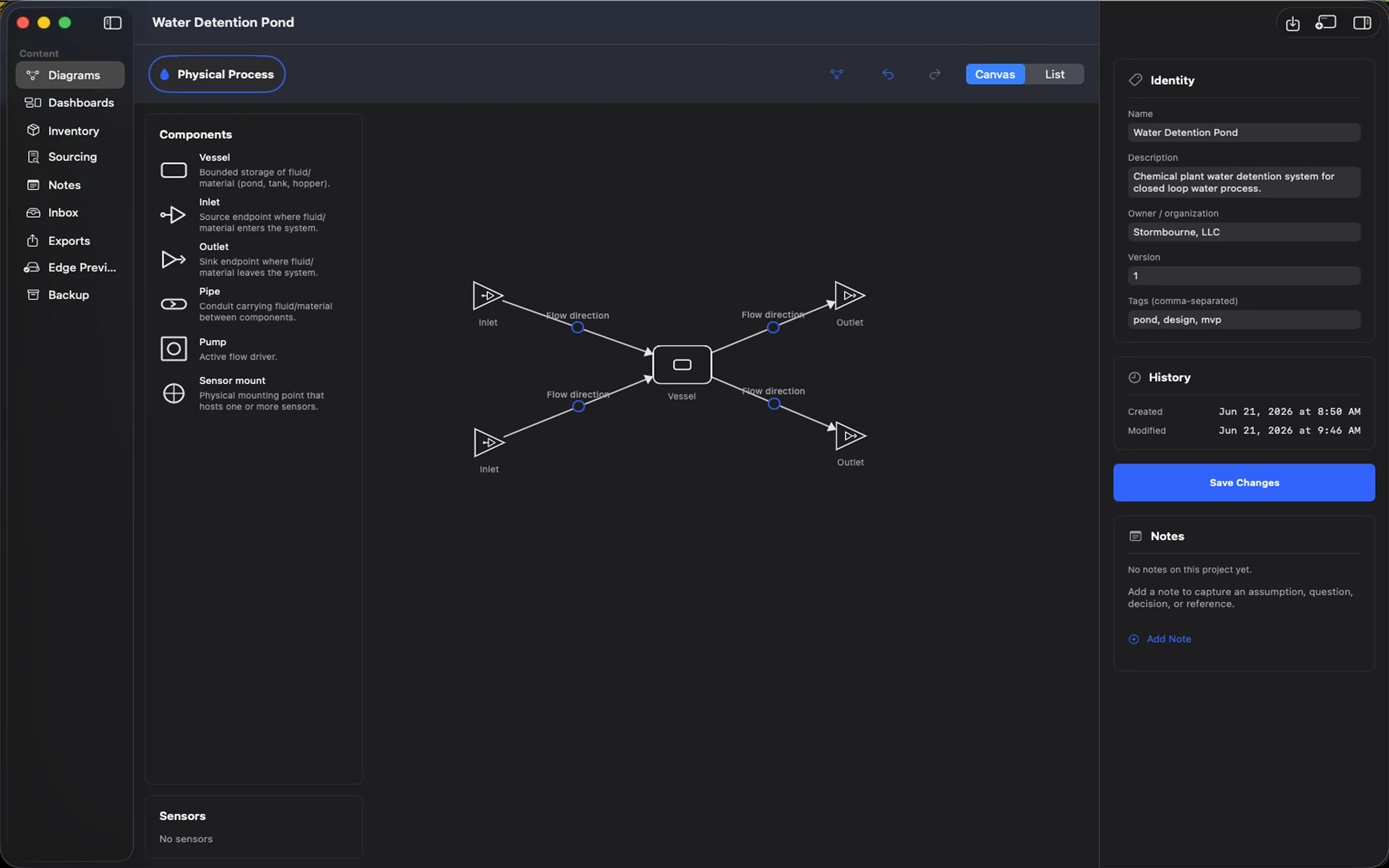
The TameChaos Studio app on macOS showing the topology canvas for a process named “Water Detention Pond”: a component palette (vessel, inlet, outlet, pipe, pump, sensor mount) on the left, a process diagram of two inlets and two outlets joined by flow paths to a central vessel in the canvas, and an identity panel describing the project — owner, version, and tags — on the right.
Studio — topology canvas on Mac
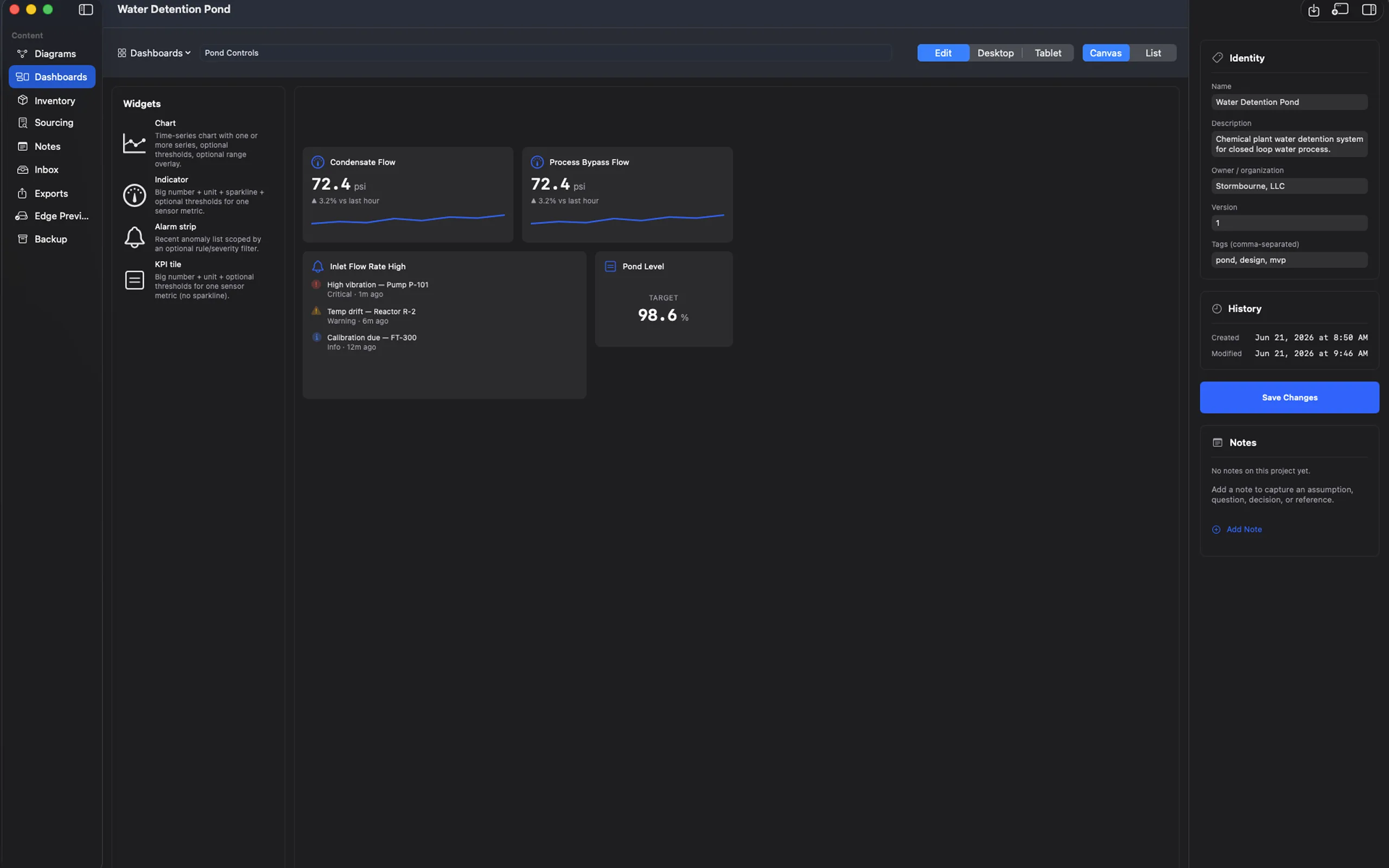
The TameChaos Studio HMI and dashboard mockup composer on macOS: a grid-snapped operator dashboard called “Pond Controls” for the “Water Detention Pond” project, laid out from a widget palette (chart, indicator, alarm strip, KPI tile) into flow indicators with a sparkline trend, an alarm strip listing recent anomalies, and a target KPI tile — a static design artifact, not a live dashboard.
Studio — HMI mockup on Mac
What it is

An engineering design system for sensor-driven systems

Model the place, the process, and the control system; specify what it’s built from; mock up how it will be operated; and take a documented package out the other end — before any of it exists.
Design before you build
Lay out the facility, the process, the instruments, the control topology, and the operator views as one working engineering model — and catch the gaps on screen, before any hardware is bought or wired.
Vendor-neutral by design
Model systems independent of any one platform or supplier, and specify them against a catalog that references parts neutrally. Nothing ranks, reorders, or favours a vendor for you.
Standalone — a runtime is optional
Studio delivers on its own: diagrams, facilities, sourcing research, HMI mockups, and a documentation package. Exporting to the TameChaos edge is something you do when, and if, you choose to.
Platforms

Mac, iPad, iPhone, and Windows

Studio is several implementations of one design core — a SwiftUI app on the Apple platforms and a WPF application on Windows — and both desktop builds are in the first release. A Studio project is the same project on every one of them.
Mac
The primary engineering workstation: full canvas authoring — topology, comms, facilities, symbols, HMI mockups, notes, sourcing, and the documentation export.
iPad
A serious touch-first authoring surface, not a viewer — edit topology and HMI mockups, work the facility and sourcing views, and capture notes on the move.
iPhone
The same project navigator in compact form: everything but the canvas, including node-first capture that writes straight into the physical-process diagram, offline.
Windows
A WPF application on .NET 10, built as a close sibling of the Mac app on the same design core and the same project format — in the first release alongside it.

Android is TameChaos Field. Field is the Android platform surface of this same core — it authors a real Studio project on site with no server, no Mac, and no network. It is its own product rather than a fifth Studio build, because it adds what the other platforms can’t: an optional Edge companion, and rugged hardware. See Field →

What you can do

Model, specify, mock up, and document — end to end

A topology-centric workspace: design the physical and control system, specify what it’s made of, mock up the operator views, and export the whole package.
Physical topology editor
Drag out your process — vessels, pumps, valves, sensors — draw the connections between them, and designate what each one is: a pipe, a wire, a conduit. Panels and cabinets contain what you drop into them.
Communication & control topology
Draft your PLCs, RTUs, HMIs, historians, and gateways with protocol, segment, and vendor metadata. Drafting only — Studio doesn’t simulate the transport.
Catalog selection on the node
In the first release a placed node carries its own catalog part, so specifying the design is something you do on the drawing rather than in a spreadsheet beside it.
HMI / dashboard mockup composer
Lay out operator views — charts, indicators, alarm strips, KPI tiles — bound to your sensors with units and thresholds. A design artifact, not a live dashboard.
Engineering notebook
Markdown notes you can attach to the project or any node — assumptions, open questions, decisions, references — and search across all of it.
Professional documentation export
Generate a complete engineering package — topology, comms, inventory and sourcing, HMI mockups, and notes — as Markdown and PDF. The standalone deliverable.
Node-first field capture
Walk a site on iPhone and capture photos, evidence, and notes offline — written straight into the physical-process diagram as real nodes, not a bundle to reconcile later.
Local-first & encrypted
Your project lives on-device, encrypted at rest. Versioned encrypted backups go to Files or iCloud Drive, and snapshots hand a project off between Mac and iPad.
Design authority

Studio owns design time. A runtime owns execution.

One split explains how a design tool can lead an edge-first platform: authority divides by role, not by product. Studio is authoritative over the design; the runtime engine is authoritative over what actually happens.
Studio owns the design
Studio is the design-time authority for the whole systems model: the topology, the facility, the type vocabulary, the symbols bound to it, and the catalog parts behind them. Nothing upstream caps what you are allowed to model.
Projects that describe themselves
In the first release a project carries its own vocabulary — the base version it started from, plus anything the project adds and the symbols bound to each kind — so it opens and validates on its own terms rather than against a schema compiled into some other app.
The design → runtime boundary
Studio owns design time; a runtime owns execution. They meet at that self-describing project — a package a runtime reads and validates, not a live pipe into it. Today that runtime is the TameChaos edge, and Studio never requires one to be useful.
Your own kinds, your own palette
Defining component kinds the base vocabulary doesn’t have, binding each one a symbol, and curating a palette down to your discipline is decided and sits on the roadmap after the first release.

What design authority doesn’t mean

It doesn’t move execution into Studio, and it doesn’t demote the edge. The edge is still the authoritative runtime — reordered in sequence, not in importance — and a design never overrules what a running system measures. Studio owns the model; the runtime owns the result; the two meet at a project package that describes itself.

Standards-conformant symbols

Drawings an instrumentation engineer recognizes

A hexagon-framed pictograph is not a P&ID symbol. An ISA field instrument is a bare circle with a loop tag; a gate valve is a bowtie; an IEC 61131 contact is two bars on a rung. Studio draws them that way — in the TameChaos line style, so they’re standard-faithful and still unmistakably ours.
Drawn to the standards
ANSI/ISA-5.1, IEC 60617, and IEC 61131-3 geometry, redrawn in the TameChaos line style — an instrument bubble is a bare circle, a check valve a bowtie with a flap. Compatible with those standards and referencing them by name; not certified against them.
Ports and tag zones, not just pictures
Each symbol carries named connection anchors typed by what they carry — process, signal, electrical, mechanical, data — so an editor can route lines and refuse a connection that makes no sense. ISA loop tags are typeset live over the body, never baked into the artwork.
A base set, plus thin sector profiles
A general-control base covers most process and control drawings whatever the sector; water and wastewater, manufacturing, facilities, HVAC air-side, electrical, and PLC logic layer on top of it as profiles rather than as duplicate libraries that drift apart.

The symbol library itself is drawn and shipped in the TameChaos design system today. Enabling packages per project and binding a symbol to each of your component kinds arrives with the first Studio release; the electrical, logic, and HVAC families reach the desktop platforms after it.

Facilities & systems modeling

A model of a place, not a folder of drawings

Real systems live somewhere, span two domains that reference each other, and are built out of things that behave. The model carries all three.
Facilities, not loose drawings
A project holds one or more facilities, and every diagram belongs to exactly one of them. A facility owns both halves of a place — the physical process and the comms and control side — and carries a real-world location, so a design is anchored to where it actually is.
Components, connectors, containers
Every kind is one of three things, and the model knows which. A pipe or a wire is a connection you draw and then designate. A panel or a cabinet is an enclosure that owns and moves what you drop inside it.
The two domains, associated
The control drawing and the process drawing stay separate documents that reference each other: a PLC controls a pump, an RTU monitors a sensor mount, a controller is housed in a panel. Each fact is stored once, in one direction, and checked at both ends.
Behaviour on the component
Components declare typed inputs and outputs with units, and a connector carries a signal from one to the next — so the drawing is a graph, and a component’s behaviour can come from a model or from data you recorded off the real thing. That is what makes reverse-engineering an existing system first-class rather than an afterthought.

What a geolocated facility is for, and when

The first release builds the entity and the location slot, and puts your facilities on a map. What that location unlocks is staged behind it: environmental conditions grounded in real weather at those coordinates, and radio propagation between sites, are on the roadmap. So is running the behavioural model you’ve authored — in the first release Studio builds that structure; executing it, comparing a design against a recording, and fitting a model to one come later.

Procurement economics

What you designed, and what it will cost to build

The point of specifying a design against real parts is the number at the end of it. Here is exactly how far that goes — and how far it doesn’t.
The drawing is the bill of materials
A placed node carries its own catalog part, so the bill of materials is generated from the drawing rather than maintained beside it — with a quantity per instance and a roll-up across every instance of the same part.
In the first release
It walks the whole drawing
Not only the equipment. Connectors are procurable media — pipe by length and diameter, wire by gauge, conduit by trade size — and an enclosure is a line item plus everything inside it, rolled up as a sub-assembly.
In the first release
Budgetary pricing, stamped with its date
Planning numbers, never a quote. Every price carries the date it was priced, and past a staleness threshold it renders as stale rather than as a figure you might act on. Pricing never reorders or favours a vendor.
In the first release
A vendor-neutral catalog underneath
Parts are referenced by neutral catalog id and classified by a shared taxonomy — which is what lets a line item derive the accessories, licences, services, and documentation a part implies, and surface a node you haven’t specified yet as a gap instead of dropping it.
In the first release
The Procurement Package
The bill of materials plus the design that produced it — project summary, topology, control narrative, I/O, network and power summaries, documentation references — exported as one versioned artifact you can snapshot, so a scope you send out stays fixed while the design moves on.
In the first release
Supplier offers in Sourcing
Comparing vendor-identified offers side by side — price breaks, stock, lead time, minimum order — is designed but is not a settled decision yet. Until it is, Sourcing shows the budgetary projection and says so.
On the roadmap
A private RFQ to integrators you pick
Publish an immutable snapshot as a directed, private request for quote; invite specific vetted integrators; receive sealed bids only you can see. Never openly listed, no directory to browse, no live ranking — and you choose per RFQ how much of the design travels with the line items.
On the roadmap

Studio plans. It doesn’t buy.

There is no live distributor feed, no ordering rail, and no quote or purchase-order generation anywhere in this — budgetary pricing is planning context, and in a request for quote the real number is the integrator’s. TameChaos brokers that exchange and is not a party to it: no commission, no listing fee, no escrow, no payment rail, and we never rank, score, or recommend a bid. Nothing here shares your design across tenants — an RFQ reaches only the integrators you name, their bids are sealed to everyone but you, and no integrator can see who else you asked.

Where Studio is

In development → pre-release testing → MVP

Studio is early, on a near-term track to a dated first release. Here's the honest staging — a pre-release build is early access, not a finished product.
Now
1 · In development
Studio is being built across the capabilities above, on both desktop platforms at once — the Apple build and the Windows build are both in this release. It’s pre-release software, not a finished product.
Next
2 · Pre-release testing
An early build goes out for testing — on TestFlight for the Apple platforms, ahead of the store release. It’s early, rough in places, and still changing; it is not a feature-complete release.
Target August 31, 2026
3 · MVP
The first shippable Studio: the systems model and its vocabulary, topology with components, connectors and containers, facilities, standards-compatible symbols, HMI mockups, notes, the documentation package, and the bill of materials generated from the drawing.

How it will ship

The Apple builds are distributed through the App Store, and the Mac build through the Mac App Store — not as a direct download. TestFlight is pre-release testing of that same build, not a separate channel. Your project is encrypted on device either way, deliberately in a form the other Studio platforms can still open rather than one that strands it on Apple hardware. The Windows build’s distribution channel hasn’t been announced.

Honest scope

Studio designs and documents. A runtime executes.

Studio is an engineering design and documentation environment — not a runtime, a SCADA or DCS replacement, a simulation engine, or a purchasing system. Here's exactly where each line is.
What Studio does
Design, specify, mock up, and document a real-world system — standalone, before any of it is built and before any runtime exists.
  • Model the facility, the process, and the control topology
  • Draw with symbols compatible with ISA-5.1, IEC 60617, and IEC 61131-3
  • Mock up operator HMIs as design artifacts
  • Export an industrial-quality documentation package
  • In the first release: a bill of materials with budgetary costs
What it isn’t (yet)
Simulation, digital twins, and live operation are future goals (ADR-0092) — and standards-conformant drawings are still not certified ones.
  • Standards-compatible is not certified — standards are referenced by name
  • Still not a P&ID editor — a design and documentation environment
  • No simulation, digital twin, or live telemetry
  • HMI mockups are static — not a live dashboard
  • Comms topology is drafting only — no transport simulation
  • No quotes, no purchase orders, no ordering rail
  • Single-user with snapshot handoff — no live sync or collaboration

Get early access to Studio

Studio is pre-release, with the first release targeted for August 31, 2026. Ask for early access and we’ll send your invite when the build opens — TestFlight for the Apple platforms, and the Windows build as soon as its channel is announced.
App Store — coming soon

Apple builds via TestFlight, then the App Store · Windows channel to be announced